Configure a VPN Profile on the BlackBerry
A virtual private network (VPN) profile contains the information required by a user account to log in to a VPN.
Note: To be valid, the VPN profile created on the BlackBerry smartphone must match the VPN profile created on the BlackBerry® Enterprise Server.
This blackberry vpn tutorial can be used for all Blackberry OS 4 5 6 7
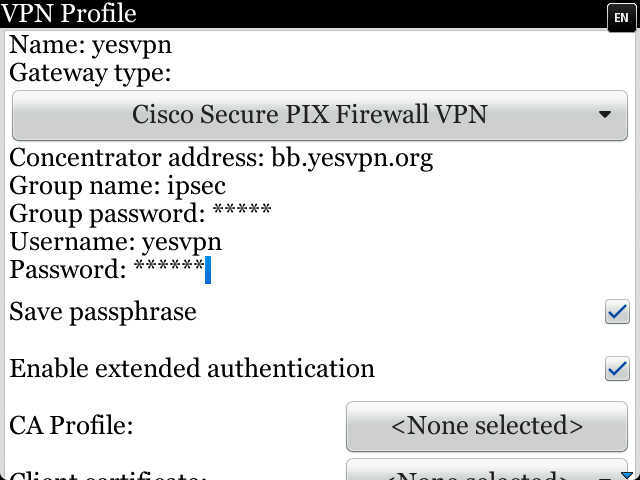
Gateway Type : Cisco Secure PIX Firewall VPN
Concentrator=bb.vpntraffic.com
Group name= ipsec
Group password=ipsec
Username=your vpn account
User Password=your vpn password
Save passphrase: click
Enable extended authentication:click
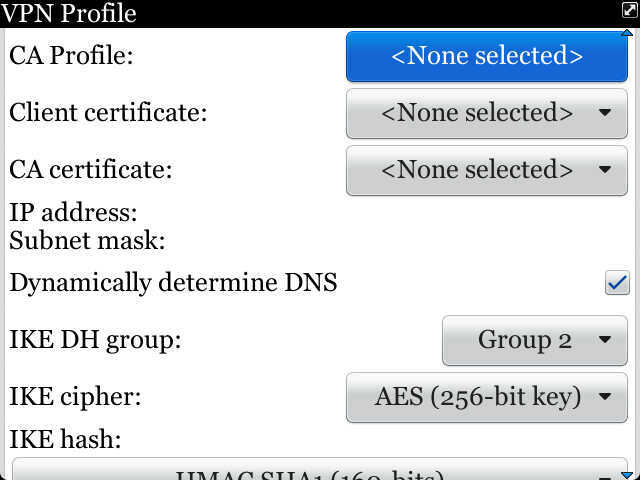
Dynamically determine DNS:click
IKE DH Group : Group2
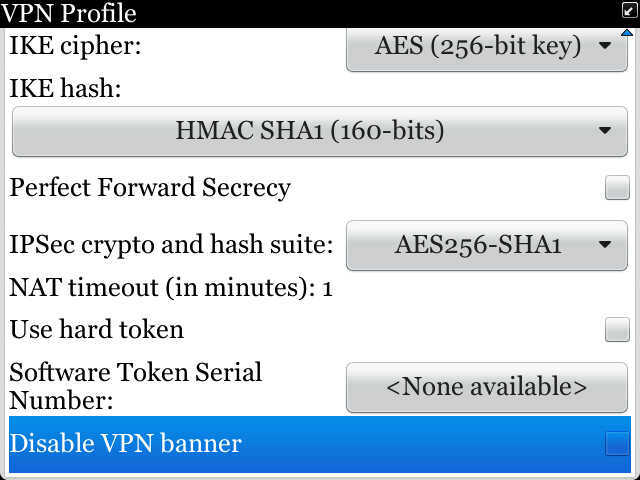
IKE cipher : AES(256)
IKE hash : HMAC SHA1(160)
Prefer Forward Secrecy:Don't click
IPSec cryto and hash suit : AES256-SHA1
use hard token:Don't click
What you need is a VPN account !
Before you make an order, you can Trial our VPN Service for 3 days.
• Only $1.99
• High Speed
• All country server

|
$5 Package = 1 Account = VPN servers of US, AU, UK, CA, RU, Italy, Japan, Korea, HK, etc.
You can switch between our servers at any time (40+ countries vpn server)
1 Month/30 days
• Only $5
• High Speed
• All country server
3 Months/90 days
• Only $10
• High Speed
• All country server
One Year/365 days
• Only $35
• High Speed
• All country server
|
|
|


 US
US  UK
UK  CA
CA 

 France


.gif "germany vpn") Germany
Germany 

 Ireland
 Romania

 Ukraine
  Hong Kong
 Philippines
 Thailand
  Indonesia
 China
China  Singapore

 Korea
Korea  Mexico
  United Arab Emirates
  Turkey

 Cyprus
 Argentina
  Chile
Chile 


 Kenya
Kenya